If you are a motorist in Metro Manila, you may have heard about mmda ncap check plate, May Huli Ka, or the No Contact Apprehension Policy. The system was designed to help authorities monitor traffic violations through cameras and other technology instead of requiring a traffic enforcer to physically stop every vehicle.
For motorists, understanding how mmda ncap check plate works is important because a traffic violation may be recorded even when you are not personally stopped on the road. The May Huli Ka portal provides an online way for motorists and authorized vehicle owners to access applicable violation information and related services.
The MMDA’s current vehicle portal is designed to let users securely register vehicles, view traffic violations, receive ticket updates, and monitor case information. It also supports multiple vehicles for individuals and fleet operators.
Important: Always use official MMDA and LTO websites when checking traffic-related information. Avoid entering your vehicle or personal information into websites that are not connected with the relevant government agency. visit homepage for more
What Is MMDA NCAP?
mmda ncap check plate stands for the Metropolitan Manila Development Authority No Contact Apprehension Policy. It refers to technology-assisted traffic enforcement in which cameras and related systems can record suspected traffic violations.
The basic idea behind No Contact Apprehension is simple: instead of requiring a traffic officer to stop the vehicle at the exact moment of the violation, an enforcement camera can capture information about the incident for subsequent review.
Depending on the enforcement location and applicable rules, recorded information may include:
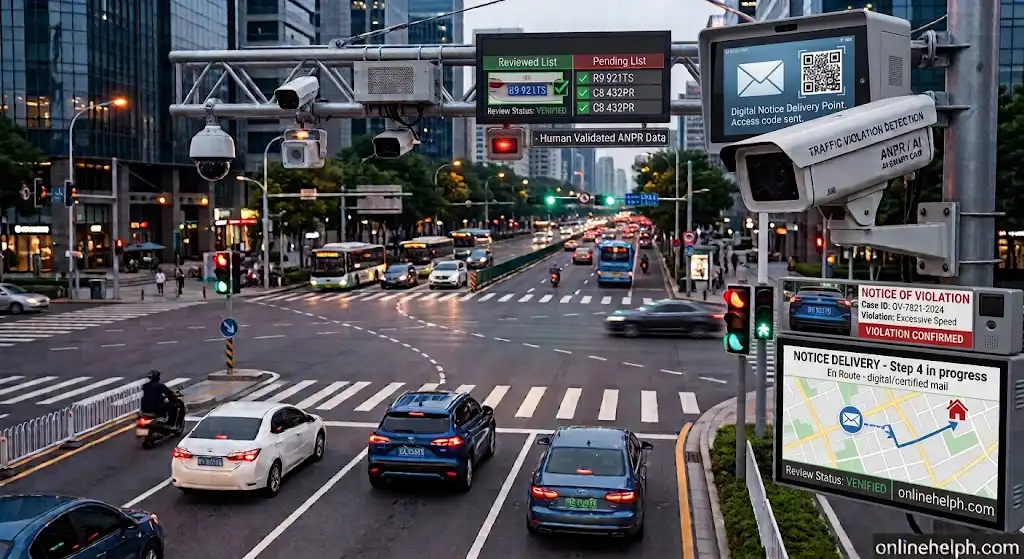
The captured incident is not simply treated as a final penalty at the moment the camera records it. The available system information indicates that violation records and evidence can go through review and verification before a Notice of Violation (NOV) is issued.
How Does the MMDA NCAP Process Work?
Understanding the complete mmda ncap check plate process can make it easier to know what happens after a suspected traffic violation is detected.
Step 1: Traffic Violation Detection
A camera or other approved traffic-enforcement technology records a suspected violation. Depending on the location, this may involve traffic signals, restricted lanes, road markings, vehicle movement, or other enforceable traffic rules.
The purpose of this stage is to capture evidence that can be reviewed by the responsible authorities.

Step 2: Review and Verification
After detection, the available evidence can be reviewed by authorized personnel. This step is important because the recorded incident needs to be evaluated before a violation notice is processed.
The review may involve examining photographs, video evidence, vehicle information, date, time, location, and the circumstances surrounding the alleged violation.

Step 3: Notice of Violation
If the apprehension is validated, a Notice of Violation (NOV) may be generated.
The notice can contain important information such as the alleged traffic violation, date and time, location, applicable fine or penalty, vehicle information, and instructions for contesting or settling the citation.
A joint memorandum involving the LTO and traffic-enforcement agencies provides that a notice may be served through methods such as registered mail, courier, electronic transmission, or mobile messaging, using available registered-owner information.

Step 4: Notice Delivery
The registered vehicle owner may receive the Notice of Violation through the applicable delivery or electronic notification method.
This is why keeping your vehicle registration and contact information updated is important. If the registered owner’s details are outdated, receiving an important traffic notice can become more difficult.
Step 5: Check, Contest or Settle
Once you have a violation record or notice, you may need to determine whether to:
The MMDA vehicle portal is intended to provide a secure place for users to manage applicable violation information and related case transactions.

What Is May Huli Ka?
May Huli Ka is the name associated with the MMDA’s online system for handling traffic-violation information under the No Contact Apprehension system.
Rather than relying only on a physical notice, the online portal can help authorized motorists access information connected with their vehicle and traffic records.
The current portal also emphasizes secure access and vehicle registration. Users can register vehicles, view violations, receive ticket updates, and monitor case status. Businesses and fleet operators can also manage multiple vehicles through one account.
This makes May Huli Ka particularly useful for people who manage several vehicles, including company vehicles and commercial fleets.
Why Is MMDA NCAP Important for Motorists?
The main reason motorists should understand mmda ncap check plate is that traffic enforcement does not necessarily require a roadside interaction.
For example, a driver may pass through a monitored road and continue the journey without being stopped. If an alleged violation is recorded and subsequently validated, the registered owner may later receive a Notice of Violation.
Knowing how to check May Huli Ka, understand an NOV, review available evidence, and identify the correct payment or contest procedure can prevent confusion.
It is also important to distinguish between an alleged violation, the review/validation process, and the eventual status of a citation. Motorists should read the actual notice and current instructions rather than relying solely on social-media posts or unofficial websites.
What Information May Be Needed to Check an NCAP Record?
When accessing the May Huli Ka portal, users may be asked to provide information that helps authenticate the vehicle record.
Depending on the available search option, the system may use information such as:
The use of additional identifying information is intended to make vehicle-related records less openly searchable and to help protect personal information.
MMDA’s published privacy statement explains that the system may process information connected with vehicle records, violation identifiers, evidence, account activity, and related transactions.
Official MMDA and LTO Websites
For a reliable mmda ncap check plate 2026 lookup, start with the official government sources.
MMDA May Huli Ka Portal: May Huli Ka Official Portal
LTO Land Transportation Management System (LTMS): LTO LTMS Official Portal
The LTO’s official LTMS provides online services related to motor vehicles, driver’s licenses, and certain traffic-related transactions. Official site
Quick MMDA NCAP Checklist
Before checking your May Huli Ka record, keep these details available:
Do not share passwords, one-time passwords, payment information, or unnecessary personal information with unofficial websites or individuals claiming they can check an mmda ncap check plate record for you.
What Comes Next?
Checking the portal is only the first part of understanding an mmda ncap check plate citation. The next step is learning exactly how to check MMDA NCAP violations online, what information to enter, what happens when a record is found, and how motorists can review their violation details.
How to Check May Huli Ka Violations Online, Fines & Payment
After understanding how the MMDA NCAP system works, the next important step is knowing how to check whether your vehicle has an NCAP violation. The May Huli Ka online portal is designed to help authorized vehicle owners access applicable traffic-violation records and manage related transactions.
If you received a Notice of Violation (NOV) or simply want to check the status of your vehicle, use the official MMDA portal rather than an unofficial website.
Official May Huli Ka Website:
MMDA May Huli Ka Official Prtal
How to Check MMDA NCAP Violations Online
The online checking process is designed to use vehicle-related information for authentication. This helps prevent unauthorized people from simply entering a plate number and viewing another person’s vehicle information.
Before starting, prepare the relevant details from your LTO Certificate of Registration (CR) or your Notice of Violation.
Information You May Need
Depending on the search method available to you, prepare one or more of the following:
Your MV File Number is particularly useful because it is associated with the vehicle’s LTO registration record.
Step-by-Step May Huli Ka Violation Check
Step 1: Open the Official Portal
Visit the official May Huli Ka website using a secure browser:
Make sure you are using the correct government website before entering vehicle information.
Avoid websites, social-media accounts, or individuals claiming that they can provide an MMDA NCAP violation check for a fee.
Step 2: Locate the Violation Checking Service
Once you open the portal, look for the section or service used to check or manage your traffic violation information.
The exact appearance of the website may change as MMDA updates the May Huli Ka platform, so follow the labels currently displayed on the official portal.
Step 3: Choose the Appropriate Search Information
The portal may provide different ways to authenticate and locate a record.
A vehicle owner may use information such as:
Plate Number / Conduction Sticker + MV File Number
or, where applicable:
Plate Number / Conduction Sticker + Ticket Number
For fleet-related accounts, the system may also support vehicle searches based on the MV File Number.
Enter the information carefully. A single incorrect character in a plate, ticket, or MV File Number can prevent the system from locating the correct record.
Step 4: Submit the Search
After entering the requested information, select the appropriate option to check your record.
The system may then display whether an applicable violation record is associated with the information you entered.
If no active record is found, the system can indicate that no matching violation was located.
If a record is found, review the information carefully before making any payment.
Step 5: Review the Violation Details
A violation record may provide information such as:
Do not rely only on the amount shown in a third-party post or social-media screenshot. The actual notice and current official portal information should be treated as the relevant source for your transaction.
What If May Huli Ka Shows a Violation?
If your MMDA NCAP search returns a violation, do not immediately assume that the record is incorrect or automatically pay without reviewing it.
First, compare the information with your own records.
Check:
This review is especially important when a vehicle has multiple drivers.
For example, a company may own a vehicle that is used by several employees. In that situation, the registered owner may receive the notice even though another person was driving the vehicle when the alleged violation occurred.
Common MMDA NCAP Violations
The types of violations associated with traffic enforcement can vary according to the applicable MMDA regulations, traffic rules, location, and enforcement program.
Common examples motorists should understand include the following.
1. Disregarding Traffic Signs and Signals
This can include actions such as:
A camera-based system can capture the vehicle’s movement and surrounding traffic situation for review.
2. Yellow Box Violation
A yellow box is intended to help keep an intersection clear for moving traffic.
A motorist who enters and stops within a yellow box when prohibited may obstruct vehicles travelling through the crossing.
This type of violation is commonly associated with traffic enforcement in Metro Manila.
3. EDSA Busway or Restricted-Lane Intrusion
Entering a restricted lane without authorization can result in enforcement action where the applicable traffic rules prohibit the vehicle from using that lane.
The EDSA Busway is a particularly important area because access restrictions are intended to maintain the dedicated public-transport corridor.
Motorists should always follow the signs and restrictions displayed on the road rather than assuming that a lane is available to ordinary vehicles.
4. Number Coding Violation
The Unified Vehicular Volume Reduction Program (UVVRP), commonly called number coding, restricts certain vehicles from travelling during designated periods based on applicable rules.
Because schedules and implementation can depend on current government policies, motorists should verify the rules applicable to their route and vehicle instead of relying on an old coding schedule.
5. Illegal Parking or Obstruction
Parking or stopping in a restricted location can interfere with traffic flow and pedestrian movement.
Where enforcement applies, cameras or other monitoring methods may contribute to the identification and processing of the violation.
6. Lane Encroachment
Drivers should remain within their designated lanes and follow road markings.
Entering a restricted motorcycle, bicycle, bus, or other special lane without authorization may result in a traffic citation where the applicable regulation prohibits the movement.
MMDA NCAP Fines and Penalties
One of the most searched questions about MMDA NCAP is: How much is the fine?
The answer depends on the specific violation and the applicable regulation. There is not one universal NCAP fine for every traffic citation.
The information supplied for this guide lists examples such as:
| Violation | Example Fine/Penalty |
|---|---|
| Disregarding traffic signs/lights | ₱1,000 |
| Yellow box obstruction | ₱1,000 |
| Number coding violation | ₱500 |
| Illegal parking/obstruction | ₱1,000–₱2,000 |
| Lane encroachment | ₱1,000 |
| EDSA Busway intrusion | May involve substantially higher penalties depending on the applicable offense and offense history |
EDSA Busway Penalties
EDSA Busway-related violations can carry penalties that are different from ordinary traffic infractions.
The supplied reference material indicates a range beginning at ₱5,000 for a first offense, with higher penalties for subsequent offenses and possible LTO-related consequences.
Because penalties and enforcement rules can be amended, motorists should confirm the amount appearing on their actual notice and the current official MMDA/LTO information before paying.
Do not use an old fine table as the final authority for a current citation.
Is the Amount on the Portal the Final Amount?
The amount displayed for a particular citation should be checked against the official notice and current settlement instructions.
Additional circumstances can affect a transaction, including:
If you believe the amount is incorrect, investigate the citation before proceeding with payment.
How to Pay an MMDA NCAP Fine
Once you have reviewed the violation and decided to settle it, use an authorized MMDA payment channel.
The available payment methods can change, so always check the instructions associated with your current citation.
Online Payment Through Digital Channels
Depending on the payment services currently supported, motorists may encounter channels such as:
Paying Through GCash or Another Supported E-Wallet
A typical payment process may involve:
The exact menu names may change when an app is updated.
Important: Before confirming a payment, make sure the biller, reference number, vehicle-related information, and amount are correct.
Paying Through LandBank Link.BizPortal
Where supported for the applicable transaction, LandBank Link.BizPortal can provide an online payment route.
A typical process is:
If the MMDA payment service is temporarily unavailable, use another currently authorized channel rather than relying on an unofficial payment page.
Paying Through Bayad
Bayad may also provide an over-the-counter or digital payment option when supported by the current MMDA payment arrangements.
Before paying, confirm that the branch or service is currently authorized to accept the particular MMDA traffic-fine transaction.
What Should You Do After Paying?
Do not immediately delete your payment confirmation.
Keep:
The MMDA NCAP database may need time to reflect a payment depending on the payment channel and processing arrangements.
If your record does not update immediately, retain the proof of payment and follow the official instructions for checking or requesting assistance.
Can You Contest an MMDA NCAP Violation?
Yes, motorists who believe that a citation was issued incorrectly may have an opportunity to contest it through the applicable adjudication process.
Examples of situations that may require review can include:
A contest should be based on facts and supporting documents rather than simply disagreeing with the citation.
The applicable deadline and procedure should be confirmed from the actual Notice of Violation and current MMDA instructions.
Documents to Prepare for a Dispute
If you intend to challenge an MMDA NCAP citation, useful supporting documents may include:
The stronger your documentation, the easier it is for the adjudicating authority to evaluate the circumstances.
Key Takeaways
The most important points to remember are:
Conclusion
Understanding MMDA NCAP can help motorists avoid confusion when a traffic violation is recorded without a roadside apprehension. The May Huli Ka portal gives authorised vehicle owners a convenient way to check applicable violation records, review citation details, and monitor related transactions online.
If you suspect that your vehicle has an NCAP violation, start by checking the official May Huli Ka portal and keeping your plate number, MV File Number, or Notice of Violation details ready. Before paying any fine, carefully review the violation information, date, location, applicable penalty, and available evidence.
It is equally important to stay alert for fraudulent messages and unofficial payment websites. Use official MMDA and LTO channels, keep your payment receipt if you settle a citation, and follow the proper process if you believe a violation was recorded incorrectly.
Read more
NBI Clearance Renewal 2026: Online Registration, Requirements, Appointment, Fees & Complete Guide
PAIS PNP Online 2026: Login, Registration, Personnel Data & Complete User Guide
PNP Payslip Online 2026 Login, Download & View PNP Online Payslip
DMW / POEA eRegistration 2026: Complete Online Registration, Login & User Guide