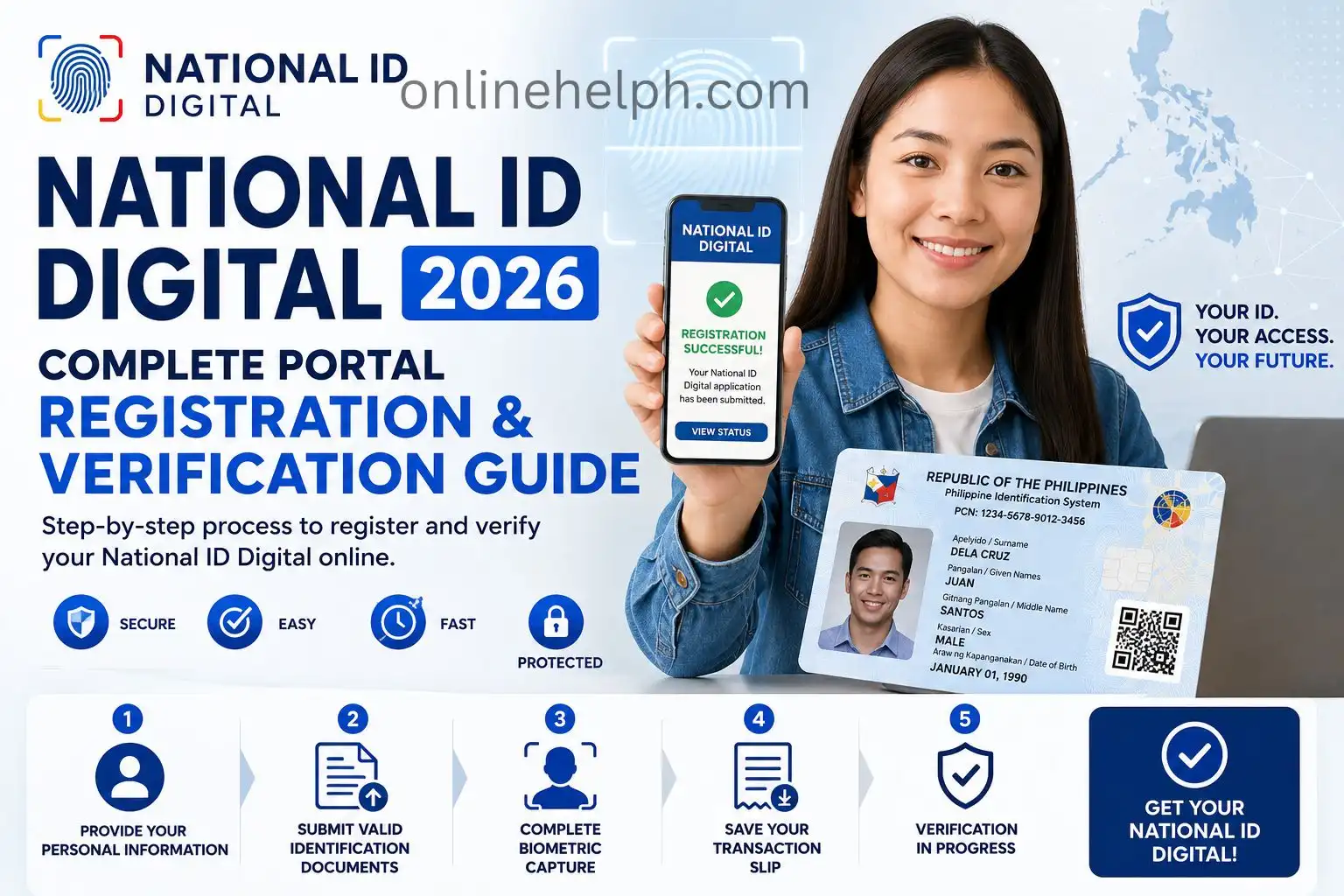
The National ID Digital is the official digital version of the Philippine National ID provided through the Philippine Identification System (PhilSys). It enables registered Filipino citizens and resident aliens to securely confirm their identity using a smartphone, tablet, or any device with internet access. After successful authentication through the official PhilSys platform, the Digital National ID has the same legal recognition as the physical PhilID card and the printable ePhilID.
Designed for convenience and secure identity verification, the Digital National ID can be used to access government services, open bank accounts, claim government benefits, and complete both online and face-to-face transactions. With advanced security and authentication features, it offers a safe, reliable, and paperless way to prove your identity without the need to carry a physical ID card.”
What Is the National ID Digital
The National ID Digital serves as the official electronic identity credential connected to your PhilSys registration. Once your identity has been successfully verified, you can securely access it through authorised government platforms whenever digital or in-person identity verification is needed.
Rather than relying on a simple image or scanned copy of your identification card, the Digital National ID uses robust security technologies to safeguard your personal information. It includes encrypted data and a secure, dynamically generated QR code that authorised organisations can verify instantly in real time. These security features reduce the risk of identity fraud while providing a fast, reliable, and secure method of proving your identity across a wide range of government and private sector services. Visit Homepage
National ID Digital Registration Process
Step 1: Provide Your Personal Information
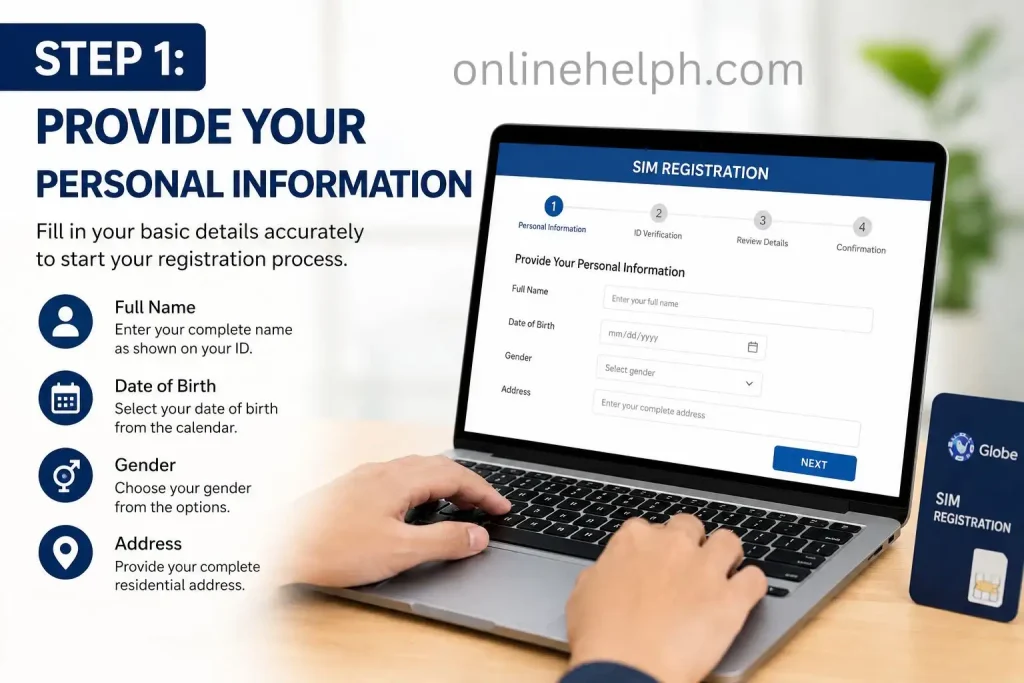
Start your registration by visiting the official PhilSys registration website or an authorised PSA registration centre. You will be asked to enter accurate personal details to create your official PhilSys record.
Prepare the following information:
Ensure that all information matches your supporting documents to avoid delays during verification.
Step 2: Submit Valid Identification Documents
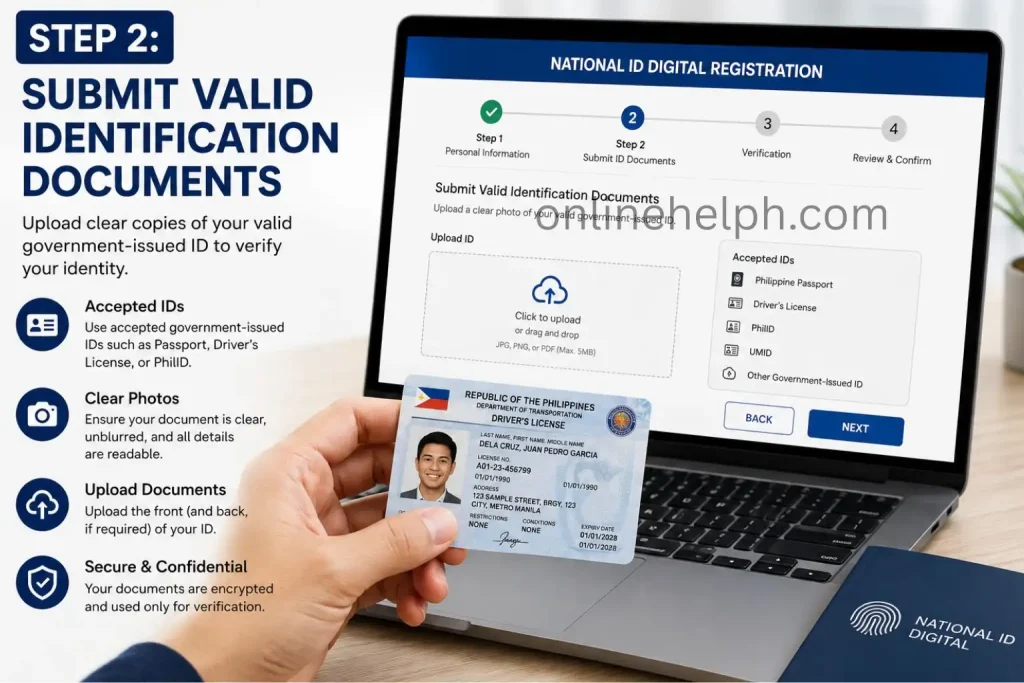
Once your personal details have been recorded, you must present acceptable identification documents to verify your identity.
You may provide one valid primary ID, such as:
If you do not have a primary ID, you may instead submit two valid secondary documents, depending on PhilSys requirements. These may include:
Make sure all submitted documents are valid, legible, and contain accurate personal information.
Step 3: Complete Biometric Capture
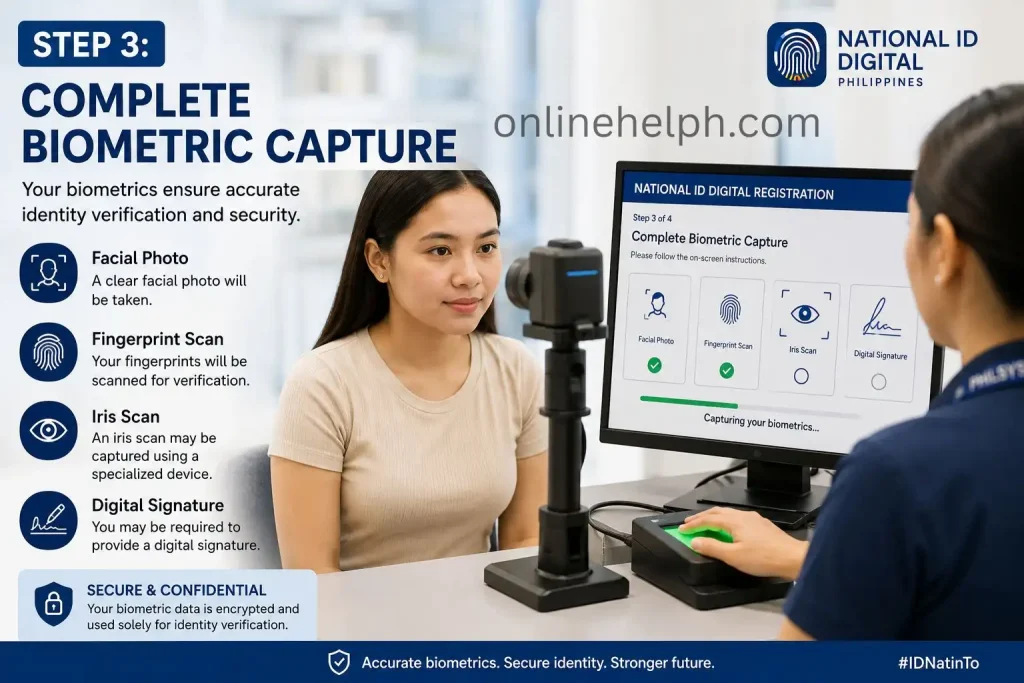
After your documents have been verified, visit a PSA Fixed Registration Centre or an authorised mobile registration site to complete your biometric enrolment. This step confirms your identity and securely links your biometric data to your PhilSys record.
During biometric capture, the following information will be collected:
These biometric records help protect your identity and enable secure verification for future transactions.
Step 4: Save Your Transaction Slip
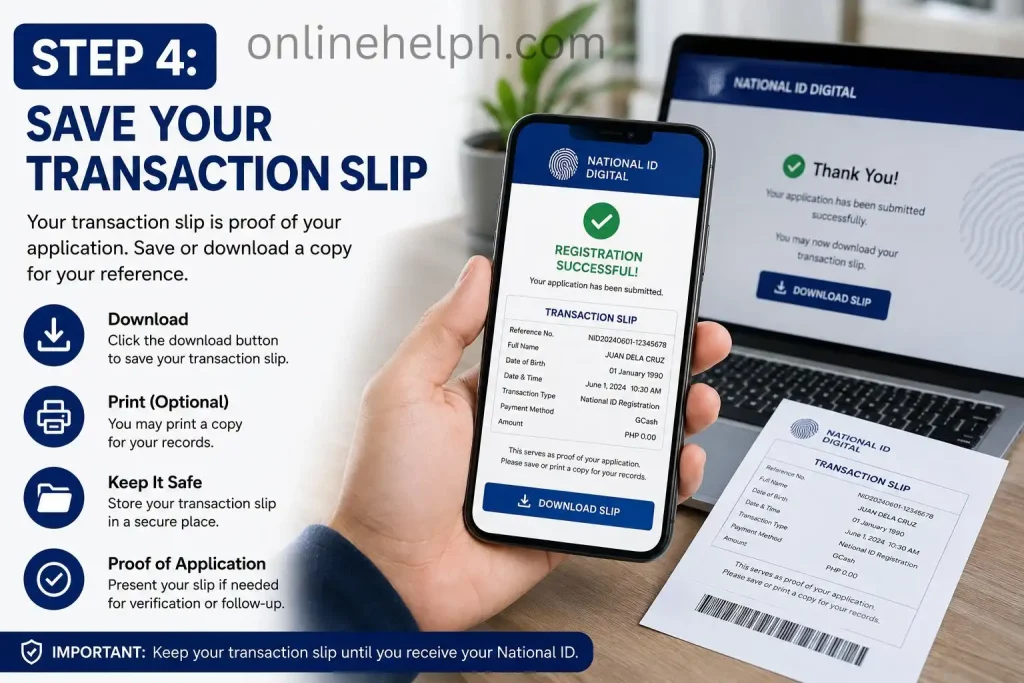
Once your registration is complete, you will receive a transaction slip containing your 29-digit PhilSys Transaction Number (PTN). Keep this slip in a secure location, as it allows you to track the progress of your application and may also be required when activating or accessing your National ID Digital after it becomes available.
Your PTN serves as an important reference throughout the registration and identity verification process, so avoid losing or damaging the transaction slip.
National ID Digital – Documents Required
| Category | Required Documents / Information | Purpose |
|---|---|---|
| Accepted Identity Documents | PSA Birth Certificate, Philippine Passport, Driver’s License, UMID Card, Postal ID, PRC ID, Seafarer’s Book, PhilHealth ID, Voter’s ID (where applicable), Senior Citizen ID, PWD ID, and other accepted government-issued IDs | Used to confirm the applicant’s identity during the National ID Digital (PhilSys) registration process. |
| Personal Details | Complete Legal Name, Date of Birth, Place of Birth, Sex, Nationality, Permanent Address, Current Residential Address (if different), Mobile Number, and Email Address (optional) | Required to create and verify your National ID Digital account and registration record. |
| Biometric Information | Live Facial Photo, Fingerprint Scan, and Iris Scan (when required) | Collects unique biometric information to establish a secure and reliable digital identity. |
| Minor Registration | PSA Birth Certificate, Parent or Guardian’s National ID or another valid government-issued ID, with the parent or guardian present during registration | Ensures the identity of children is verified according to PhilSys registration requirements. |
| Foreign Residents | Valid Passport, Alien Certificate of Registration (ACR) or other immigration documents, plus proof of legal residence in the Philippines | Confirms the applicant’s eligibility to register under the Philippine Identification System. |
| Address Verification | Utility Bill, Barangay Certificate, Bank Statement, Lease Agreement, or other official government correspondence (when requested) | Used to verify the applicant’s current residential address if additional proof is needed. |
| Updating Registration Information | PSA Marriage Certificate, Court Order, PSA Birth Certificate, or updated proof of address, depending on the requested correction | Required for changing or correcting personal information already recorded in the PhilSys database. |
| Registration Center Requirements | Original supporting documents, photocopies (recommended), an active mobile number, and appointment details if scheduled | Helps complete the registration and verification process efficiently without unnecessary delays. |
| Document Standards | All documents must be original, valid, clear, readable, and unexpired | Ensures successful identity verification and minimizes the risk of application rejection or processing delays. |
Quick Checklist
| Requirement | Status |
|---|---|
| PSA Birth Certificate | ☐ Ready |
| Valid Government-Issued ID | ☐ Ready |
| Mobile Number | ☐ Ready |
| Email Address (Optional) | ☐ Ready |
| Proof of Address (if required) | ☐ Ready |
| Supporting Documents for Updates | ☐ Ready |
| Original Documents | ☐ Ready |
| Photocopies of Documents | ☐ Ready |
| Appointment Details (if applicable) | ☐ Ready |
Things to Check Before Registering
To complete your registration without interruptions, make sure the following are in order:
Tip: Keep your CNIC and your registered mobile phone within reach while registering. This will allow you to complete OTP verification and any required identity checks quickly and without interruption.
Features & Benefits of the National ID Digital
| Feature | Benefit |
|---|---|
| Digital Identity | Access your official National ID securely from your smartphone, tablet, or other supported devices. |
| Secure Authentication | Protects your identity with encrypted verification, one-time passwords (OTP), and secure authentication methods. |
| Fast Identity Verification | Confirms your identity quickly, reducing the need to present physical identification repeatedly. |
| Government Service Access | Enables seamless access to participating government agencies and digital public services. |
| Advanced Security | Uses encrypted data and secure verification technologies to safeguard your personal information. |
| Paperless Convenience | Reduces the need to carry physical IDs or photocopies for eligible transactions. |
| Anytime, Anywhere Access | Retrieve your digital identity whenever needed using an internet-connected device. |
| Quicker Digital Transactions | Speeds up identity verification for supported online and in-person services. |
| Identity Protection | Multiple security layers help prevent fraud, identity theft, and unauthorised access. |
| Easy to Use | Features a simple and user-friendly interface suitable for users of all experience levels. |
How to Access Your National ID Digital Online
If you have already completed your PhilSys registration, you can view your National ID Digital online free of charge through the official PhilSys portal. Once your identity is successfully verified, the Digital National ID carries the same legal validity as the physical PhilID and the printable ePhilID, making it acceptable for eligible government and private sector transactions.
Step 1: Open the Official National ID Digital Portal
Using a smartphone, tablet, or computer with an internet connection, visit the official National ID Digital portal in your preferred web browser. On the homepage, click Proceed to begin the identity verification process.
Step 2: Review and Accept the Privacy Notice
Before continuing, carefully read the privacy notice and consent statement. You must grant permission for the Philippine Statistics Authority (PSA) to use your personal information and facial image exclusively for identity authentication. Once you have reviewed the terms, accept the notice to proceed.
Step 3: Enter Your PhilSys Registration Information
Provide the same personal details that were submitted during your PhilSys registration, including:
Double-check every detail before moving to the next step, as incorrect information may prevent your identity from being verified successfully.
Step 4: Complete Facial Authentication
Click Start Liveness and allow the website to access your device’s camera. Follow the on-screen instructions to complete the live face verification process.
For the highest verification success rate:
Your live facial image will be securely matched with the biometric data stored in the PhilSys database to confirm your identity.
Step 5: View Your National ID Digital
After successful verification, your National ID Digital will be displayed on the screen. Carefully review your personal information to ensure everything is accurate. You can then use your Digital National ID as valid proof of identity for eligible government services, banking, identity verification, and other authorised transactions where it is accepted.
Common National ID Digital Issues and Troubleshooting Solutions
Most users can access their National ID Digital without difficulty, but occasional verification or system-related problems may occur. In many cases, these issues are temporary and can be resolved by following the appropriate troubleshooting steps below.
| Problem | Likely Reason | How to Resolve It |
|---|---|---|
| Verification Unsuccessful or Server Timeout | Heavy website traffic or an unstable internet connection | Switch between Wi-Fi and mobile data, then try the verification process again during off-peak hours, such as early morning or late evening. |
| No Matching Record Found | Your PhilSys registration has not yet been fully processed, or the information entered does not match official records | Allow two to three weeks after completing your biometric registration before trying again. Ensure all personal details are entered exactly as they appear on your PhilSys transaction slip. |
| Face Verification Could Not Be Completed | Poor lighting, an unclear camera image, or facial accessories interfering with the scan | Use the verification feature in a bright environment, clean your camera lens, and remove items such as glasses, hats, face masks, or anything that covers your face. |
| OTP Not Received | Temporary mobile network issues or an outdated registered phone number | Refresh your network connection by turning Airplane Mode on and off. If your mobile number has changed, update your contact information at an authorised PhilSys Registration Centre before requesting another OTP. |
| Unable to Access the Downloaded PDF | Incorrect password entered for the encrypted file | Use the required password format provided by PhilSys. For example, if your name is Juan Dela Cruz and your birth date is 15 October 1995, the password should be JD19951015. |
| Digital National ID Is Not Being Accepted | The organisation may not yet be familiar with the Digital National ID verification process | Ask the organisation to verify your QR code using the official PhilSys verification system, or present your Digital National ID through the official eGovPH app or a printed copy if required. |
Security Features of the National ID Digital
The National ID Digital is protected by multiple security layers designed to safeguard personal information and ensure that only legitimate users can access and verify their digital identity.
Biometric Face Verification
To confirm a user’s identity, the National ID Digital uses live biometric facial verification. During registration, activation, or account access, the system captures a real-time facial scan and compares it with the biometric data stored in the PhilSys database. This process helps block unauthorised access by detecting and rejecting photos, screenshots, or prerecorded videos.
Password-Protected Encrypted PDF
When you download your Digital National ID, the PDF file is secured using AES encryption and protected with a unique password. This extra layer of security ensures that only the registered owner can open the document, helping keep sensitive personal information safe from unauthorised viewing.
Secure QR Code Verification
Each Digital National ID includes a cryptographically encrypted QR code containing a digital signature issued by the Philippine Statistics Authority (PSA). This feature enables organisations to verify the authenticity of the ID while reducing the risk of forgery, tampering, or duplication.
Instant Database Authentication
The National ID Digital supports real-time verification through the official PhilSys system. Whenever the QR code is scanned, the information is immediately cross-checked with the PSA database to confirm that the credential is genuine and to identify any fake, altered, suspended, or invalid records.
Where You Can Use Your National ID Digital
The National ID Digital serves as a recognised proof of identity for a wide range of transactions across both public and private sectors. Acceptance may vary by institution, and some organisations may require verification through the official PhilSys authentication system before providing services.
You can use your Digital National ID for the following purposes:
Important: The National ID Digital has the same legal validity as the physical National ID, provided it is verified through the official PhilSys authentication system and accepted by the organisation handling the transaction.
FAQS
Conclusion
The National ID Digital is transforming how identity verification works in the Philippines by offering a secure and officially recognised digital version of the PhilSys National ID. It enables citizens and eligible resident aliens to verify their identity quickly without relying solely on a physical ID card. Whether you’re accessing government services, opening a bank account, enrolling in school, applying for a job, or completing healthcare and financial transactions, the Digital National ID provides a reliable and legally valid form of identification.
Built with modern security technologies such as biometric authentication, encrypted QR code verification, and protected digital access, the system helps safeguard personal information while reducing the risk of identity fraud. As more public and private institutions continue to support digital identity verification, the National ID Digital is becoming an essential tool for secure and convenient everyday transactions
Read more