

If you are searching for globe registration sim, this complete guide explains how to register your Globe or TM SIM online, which documents you need, how to receive the OTP, what IDs are accepted, how foreigners and minors can register, and where to check your registration status.
The official globe registration sim website is:
Always use the official Globe portal when submitting your mobile number, personal information, identification documents or selfie. Globe has warned customers about fake SIM registration websites and recommends using only its official registration platform or the GlobeOne App.
Important: If you have seen the term e-Devlet while searching online, do not confuse it with globe registration sim. e, whereas the official website for Philippine globe registration sim is simreg.globe.com.ph. visit Homepage for more
What Is Globe SIM Registration?
globe registration sim is the process of registering a SIM card with the subscriber’s identity information as required under the Philippine SIM Registration Act, Republic Act No. 11934.
The requirement applies to SIMs used for mobile calls, text messaging and internet services, including physical SIM cards and eSIMs. Globe also states that the requirement covers SIMs used in mobile phones, prepaid WiFi kits and other devices.
The purpose of the law includes helping protect consumers from scams, smishing, fraud and other illegal activities involving mobile communications.
For Globe customers, the registration process can be completed through the official online registration portal or, where applicable, through the GlobeOne App.
Official Globe SIM Registration Website
If you want to start your globe registration sim online, use the official portal:
Open the Official globe registration sim Portal
Globe’s official registration system currently provides options to register a SIM, update registration details and manage SIM assignment.
Globe also provides an official registration guide with instructions for Prepaid, Postpaid, Platinum, Globe AT HOME Prepaid WiFi and Globe Mobile WiFi customers.
Other Official Globe Resources
Use these official pages instead of third-party registration websites whenever possible.
Globe SIM Registration Requirements
Before beginning your globe registration sim, prepare your personal information and a valid government-issued photo ID.
For individual subscribers, Globe currently asks for information including:
Globe states that the government-issued photo ID must be valid and not expired.
Preparing these details before starting can make the globe registration sim online process smoother.
Accepted IDs for Globe SIM Registration
Globe’s official registration information lists several acceptable identification documents, including:
The exact options presented may depend on the registration process and subscriber category. Globe’s current registration page also specifies supported file formats and image requirements.
ID Upload Requirements
For a successful globe registration sim, make sure your ID photograph is:
Globe’s registration guidance says the ID should not be blurred or cropped.
Selfie Requirements
The selfie is used as part of the identity verification process.
For better results during globe registration sim Globe recommends that your selfie:
The live Globe registration portal specifically advises users to take a selfie that is well-lit, in focus and clearly shows the face.
How to Register Globe SIM Online
The current Globe registration process can be completed through the official portal. Follow the steps below carefully.
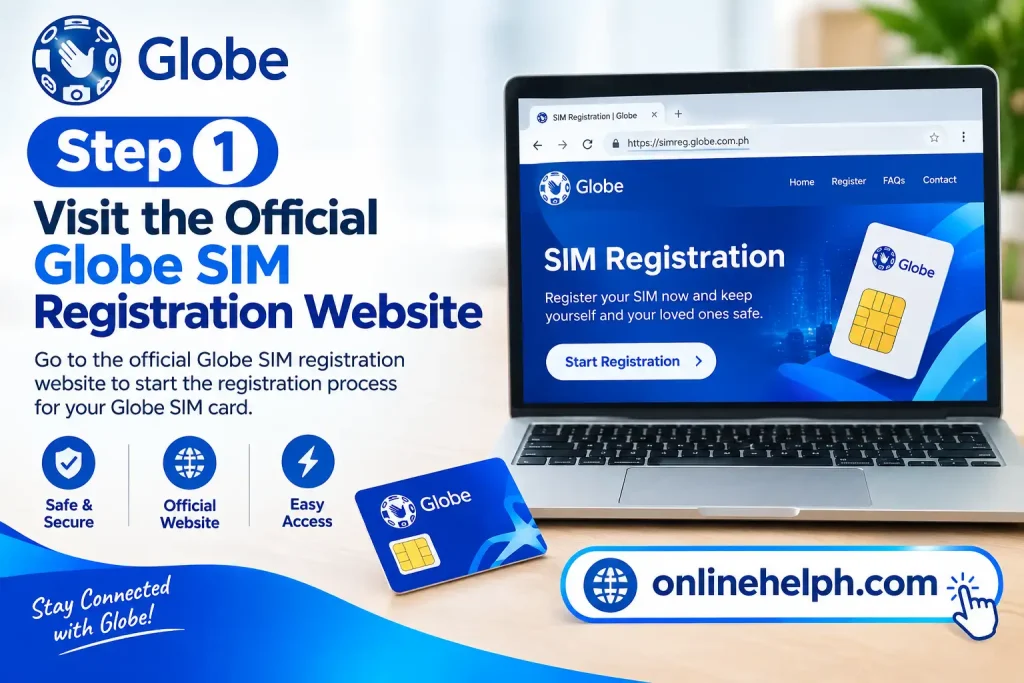
Step 1: Visit the Official Globe SIM Registration Website
Open your browser and visit:
You can also access Globe’s official SIM registration information through:
Globe Official SIM Registration Guide
Before entering any information, check the domain carefully. Globe has warned customers that fake websites have circulated online to collect sensitive information. The company says customers should use only the official SIM registration site or GlobeOne App.
Step 2: Enter Your Globe or TM Mobile Number
Enter your 10-digit mobile number in the registration field.
For example:
9171234567
Then select Register.
If your number is eligible, Globe will send a 6-digit One-Time Password (OTP) to the SIM. Globe’s official instructions state that the OTP expires after five minutes.

Step 3: Enter the OTP
Check the SMS inbox connected to your Globe or TM number.
Enter the six-digit OTP into the official registration portal before it expires.
If you do not receive the OTP immediately, check your mobile signal and use the available Resend OTP option when appropriate.

Globe Prepaid WiFi Users
If your Globe SIM is inside a prepaid WiFi modem rather than a smartphone, the OTP may be available through the modem’s dashboard.
Globe’s official instructions explain that prepaid internet kit users can access the modem dashboard, open the SMS section and retrieve the OTP from there.
Step 4: Choose Your SIM Registration Type
After mobile-number verification, the current Globe portal asks you to select the appropriate SIM registration type.
Choose the option that accurately represents your SIM and subscriber situation.
Do not use somebody else’s identity information to register your SIM. Globe specifically advises customers to register their own SIM and warns against third-party registration services that request personal information or payment.
Step 5: Provide Your ID and Selfie
The next stage of globe registration sim involves identity verification.
Prepare your valid government-issued ID and complete the selfie requirement displayed by the official portal.
Make sure your face is clearly visible and that the ID image can be read easily. If the system cannot verify your identity, retaking the photographs in better lighting may help.
Step 6: Complete the Registration Form
Enter your required personal information accurately.
The registration form can include:
Globe’s official registration instructions specifically identify these details as part of the registration form.
Use information that matches your identification document. Carefully check spelling, dates and other details before continuing.
Step 7: Review and Submit
Before completing your globe registration sim, review all information you have entered.
Globe’s current portal identifies Review Your Details as the final stage of its five-step registration flow.
Confirm that your:
are correct.
Then complete the required privacy and accuracy declarations and submit the registration.
After successful registration, Globe displays a reference number. Save this number because Globe identifies it as proof of registration.
Globe SIM Registration for Foreigners and Tourists
Foreign nationals using a Philippine Globe or TM SIM are also subject to the applicable SIM registration requirements. The documents required can vary depending on whether you are visiting the Philippines temporarily or staying for work, study or residency.
Foreign tourists should prepare their passport and other supporting information before starting the globe registration sim process.
Globe’s official guidance identifies additional requirements for foreign tourists, including:
Tourist SIM registration has a limited validity period. Globe states that a tourist SIM is valid for 30 days and will automatically deactivate after the applicable period. (globe.com.ph)
If you are travelling to the Philippines and purchase a Globe SIM for temporary use, complete the registration through the official portal rather than relying on a travel agent or unofficial website.
Official Globe Portal:
Start globe registration sim
Globe SIM Registration for Foreign Residents
Foreign nationals who live, work or study in the Philippines may have additional documentation requirements.
Depending on your circumstances, Globe may require documents such as:
The exact documents can depend on your subscriber category, so check the official Globe registration portal for the requirements shown for your specific registration type. (globe.com.ph)
Globe SIM Registration for Minors
Minors may also use Globe SIM cards, but the registration process is different when the minor does not have the required identification.
Globe states that a SIM used by a minor should be registered under the name of the parent or legal guardian. The parent or guardian may need to provide the required identification and supporting documentation. (globe.com.ph)
Before starting the registration, prepare the parent’s or guardian’s valid ID and any documents requested by Globe.
Globe SIM Registration for Multiple SIMs
If you own several Globe or TM SIM cards, each SIM needs to be registered separately.
For example, if you have three eligible SIMs, you should complete the globe registration sim process for each individual mobile number.
Do not assume that registering one Globe number automatically registers every SIM under your name. Globe’s official guidance confirms that subscribers with multiple SIMs must register each one individually. (globe.com.ph)
Globe SIM Registration for Prepaid WiFi
Globe AT HOME Prepaid WiFi users may need to follow a slightly different procedure because their SIM is installed inside a modem.
The registration process still starts through the official Globe registration system, but receiving the OTP can require access to the modem’s SMS inbox.
General Process
Globe provides specific instructions for retrieving the OTP from prepaid WiFi devices. (globe.com.ph)
Globe Mobile WiFi SIM Registration
Globe Mobile WiFi users may similarly need to access their device dashboard to receive the OTP.
If your Mobile WiFi device has an SMS inbox, check that inbox after entering the mobile number on the official registration portal.
Follow the instructions supplied by Globe for your particular device because dashboard interfaces can differ between models.
Official information:
globe registration sim Guide
Globe Postpaid SIM Registration
Globe Postpaid and Platinum customers may already have subscriber information on file because identification details were collected when the account was created.
However, Globe may still require customers to confirm or update information when necessary.
If you receive an official request to complete or confirm your globe registration sim, use an official Globe channel rather than clicking an unfamiliar link received through an unsolicited message. (globe.com.ph)
Globe Business SIM Registration
Business and corporate subscribers can have different registration requirements from individual users.
A business registration may require information about the company and its authorised representative, such as:
Because business requirements can differ according to the organisation and service, check the official Globe instructions before submitting your registration.
Can You Register a Globe SIM While Abroad?
Yes. Globe states that customers using Globe Prepaid while outside the Philippines can complete the registration through the online registration portal. (globe.com.ph)
This can be useful for Filipinos travelling or living temporarily overseas who need to maintain access to their Philippine mobile number.
Use the official portal:
globe registration sim Portal
Make sure you can receive the OTP on the Globe SIM before beginning.
How to Check Your Globe SIM Registration Status
After completing your globe registration sim, you should keep your reference number and confirmation information.
Globe provides several official ways to check or confirm registration information.
1. Check Your SMS
After registration, watch your mobile inbox for an official confirmation message.
Keep the message for your records if it confirms successful registration.
2. Check Through GlobeOne
Globe customers can use the official GlobeOne App for supported account and SIM-related services.
Official Globe website:
Globe Official Website
Use the official app stores or Globe website when downloading or accessing GlobeOne. Avoid downloading an application from an unknown third-party source.
3. Check Through the Official Portal
You can also return to the official Globe registration portal:
Check globe registration sim
If the portal provides a status or account-checking option for your number, follow the instructions displayed there.
What Does the Globe SIM Registration Reference Number Mean?
After successful registration, Globe provides a reference number.
This number can serve as evidence that your registration was successfully submitted or completed, depending on the status shown by Globe.
Save it immediately.
A simple way to keep it safe is to:
Do not post your reference number publicly or send it to unknown individuals.
Common Globe SIM Registration Problems
Although the Globe SIM registration online process is designed to be straightforward, users can sometimes experience technical or verification problems.
Here are the most common issues and practical solutions.
Problem 1: OTP Not Received
If your OTP does not arrive:
Globe’s registration instructions state that the OTP has a limited validity period, so do not continue using an expired code. (globe.com.ph)
Prepaid WiFi OTP Problem
If you are registering a Globe Prepaid WiFi SIM, check the modem’s SMS inbox rather than the SMS application on your smartphone.
Globe provides device-specific instructions for retrieving the OTP from supported prepaid WiFi modems. (globe.com.ph)
Problem 2: ID Upload Failed
An ID upload may fail if the document is unclear or the image does not meet the portal’s requirements.
Try the following:
If the problem continues, check Globe’s official registration guidance before trying another method.
Problem 3: Selfie Verification Failed
A selfie verification failure can occur when your face is difficult for the system to recognise.
Try taking another selfie while:
Globe’s official portal specifically provides selfie guidance for users completing identity verification. (simreg.globe.com.ph)
Problem 4: Personal Information Does Not Match
If the system indicates that your information does not match your ID, carefully check every field.
Common mistakes include:
Enter information exactly as required by the official registration form.
If your legal information differs between documents, use the official Globe support channel for guidance instead of deliberately entering inaccurate information.
Problem 5: Globe Registration Website Is Not Working
If the Globe SIM registration website is temporarily unavailable, try:
Most importantly, do not use an unofficial registration website simply because the official website is temporarily slow or unavailable.
Problem 6: SIM Already Registered
If the portal says your SIM is already registered but you believe the information is incorrect, do not create another registration using false information.
Instead, contact Globe through an official support channel or visit a Globe Store for assistance.
Globe provides customer support information through its official website. (globe.com.ph)
Problem 7: Registered SIM Is Not Working
If your SIM shows as registered but calls, texts or mobile data are not working, the issue may not necessarily be related to registration.
Check:
If the problem continues, contact Globe support or visit a Globe Store with the required identification.
What Happens If You Do Not Register Your Globe SIM?
SIM registration is a legal requirement covered by the Philippine SIM Registration Act.
Globe states that unregistered SIMs can be deactivated and may lose access to mobile services. (globe.com.ph)
For this reason, anyone who needs to maintain an eligible Globe or TM SIM should complete the required registration using the official Globe registration channel.
Globe SIM Registration Safety Tips
Your Globe SIM registration involves sensitive personal information, so security should be a priority.
Use Only the Official Website
Always verify that you are using:
Globe has warned customers about fraudulent websites that imitate its SIM registration service. (globe.com.ph)
Never Give Your OTP to Someone Else
Your OTP is intended for verification. Never send it to a stranger, post it on social media or provide it to someone claiming to be a registration agent.
Do Not Pay for Online SIM Registration
Globe states that SIM registration through its official channels is free. (globe.com.ph)
Be suspicious of anyone who asks you to pay simply to register your SIM online.
Avoid Pre-Registered SIM Cards
Do not purchase or use a SIM that has already been registered under another person’s identity.
Register the SIM using the appropriate subscriber information through the official Globe process.
Protect Your Identification Documents
Your government ID contains personal information. Only upload it through the official Globe registration system when required.
Do not send ID photographs through random Facebook accounts, messaging apps or unofficial websites.
Globe SIM Registration: Quick Checklist
Before starting your registration, make sure you have:
Once everything is ready, go directly to:
Official Globe SIM Registration Portal
Using the official portal is the safest way to complete your registration and avoid phishing websites.
FAQS
Conclusion
Completing your Globe SIM registration is an important step for keeping your Globe or TM mobile service active and complying with the Philippine SIM Registration Act. The process is straightforward when you have your mobile number, accurate personal information, valid government-issued ID, and selfie ready before you begin.
Whether you are registering a Globe SIM, TM SIM, prepaid WiFi SIM, or updating your registration details, always use the official Globe SIM Registration Portal or GlobeOne App. Avoid unofficial websites, social media accounts, or individuals asking for payment or your OTP, especially because SIM registration involves sensitive personal information.
After completing the registration, carefully review your information and save the reference number provided by Globe. It can be useful as proof of your registration and should be kept somewhere secure.
Read more
PNP CIRAS 2026: eFOI Portal, Login, Registration & Data Request Guide
NEO eFPS Login 2026: BIR Electronic Filing and Payment System Guide
NBI Clearance Renewal 2026: Online Registration, Requirements, Appointment, Fees & Complete Guide
MATATAG Curriculum Guide 2026
MAAG Curriculum Guide 2026


One Comment