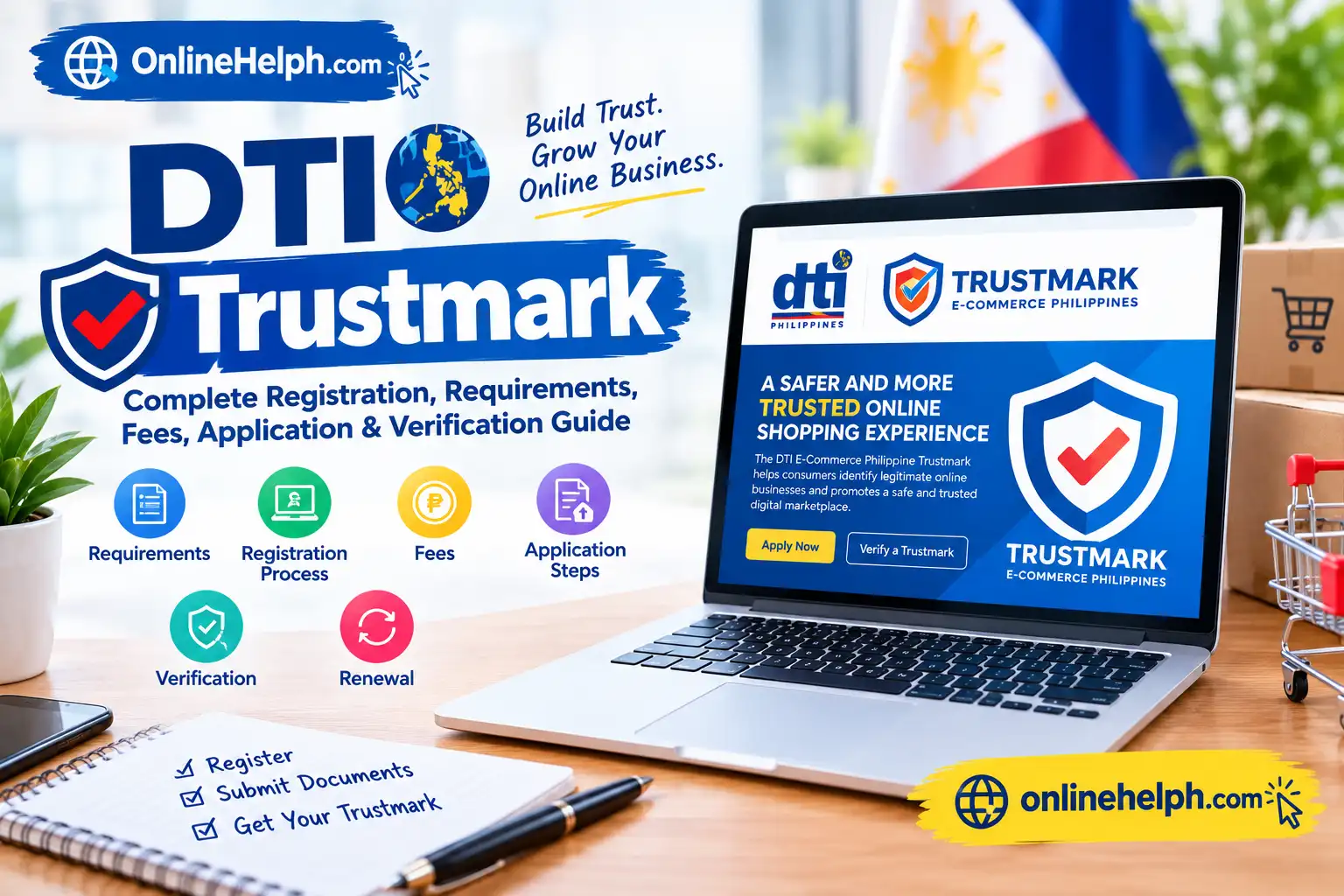
The Department of Trade and Industry Trustmark is an official digital certification mark introduced by the Department of Trade and Industry (DTI) for businesses engaged in online transactions in the Philippines. It is designed to help establish consumer confidence by showing that an online business has submitted required business information and supporting documents for Department of Trade and Industry Trustmark evaluation.
The official Department of Trade and Industry Trustmark system is operated through the DTI E-Commerce Bureau and provides online registration, application, verification, and business information services. The Trustmark is connected with the Philippine government’s efforts to promote safer, more transparent, and accountable e-commerce.
For the official portal, applicants should use only the DTI website:
Official DTI Trustmark Website
This complete Department of Trade and Industry Trustmark guide explains what the Trustmark is, who can apply, requirements, registration, application steps, fees, processing time, verification, renewal, and important compliance information. info for more
What Is DTI Trustmark?
The Department of Trade and Industry Trustmark, officially referred to as the E-Commerce Philippine Trustmark, is a digital badge issued by the DTI E-Commerce Bureau. According to the official portal, it is associated with Republic Act No. 11967, also known as the Internet Transactions Act of 2023, and promotes trustworthy, safe, and responsible online commerce.
The Department of Trade and Industry Trustmark is intended for businesses conducting internet transactions, including online merchants, e-retailers, digital platforms, and other businesses covered by applicable e-commerce rules.
A business that successfully receives the Department of Trade and Industry Trustmark can display the official badge on its website, digital storefront, seller profile, product page, or other permitted locations. The issued Trustmark includes a unique security number and QR code that can be used to verify the business through the official DTI system.
The Department of Trade and Industry Trustmark therefore gives customers a way to check business information rather than relying only on an online seller’s own claims.
Who Can Apply for DTI Trustmark?
Businesses involved in internet transactions or e-commerce may apply for the Department of Trade and Industry Trustmark, including business-to-consumer and business-to-business operations. The official FAQ specifically identifies online merchants, e-retailers, and digital platforms among eligible applicants.
Before starting a Department of Trade and Industry Trustmark application, the business should make sure that its registration records and online selling information are accurate and consistent.
Depending on the type of business, applicants may need registration documentation from:
The Department of Trade and Industry Trustmark application also requires information about the digital platforms or websites where the business conducts online sales.
DTI Trustmark Requirements
Applicants should prepare their Department of Trade and Industry Trustmark documents before beginning the online application. The official Trustmark guidelines identify the following requirements:
The current Department of Trade and Industry Trustmark homepage also states that, as of January 8, 2026, the accepted government-issued IDs for the application are Driver’s License, National ID (PhilSys), Passport, TIN ID, SSS Unified Multi-Purpose ID, and Alien Certificate of Registration (ACR).
Applicants should therefore check the official Department of Trade and Industry Trustmark portal immediately before submitting documents because requirements and portal procedures can be updated.
How to Create a DTI Trustmark Account
The first stage of the DTI Digital Trustmark process is creating an account on the official portal.
Step 1: Open the official DTI Trustmark website
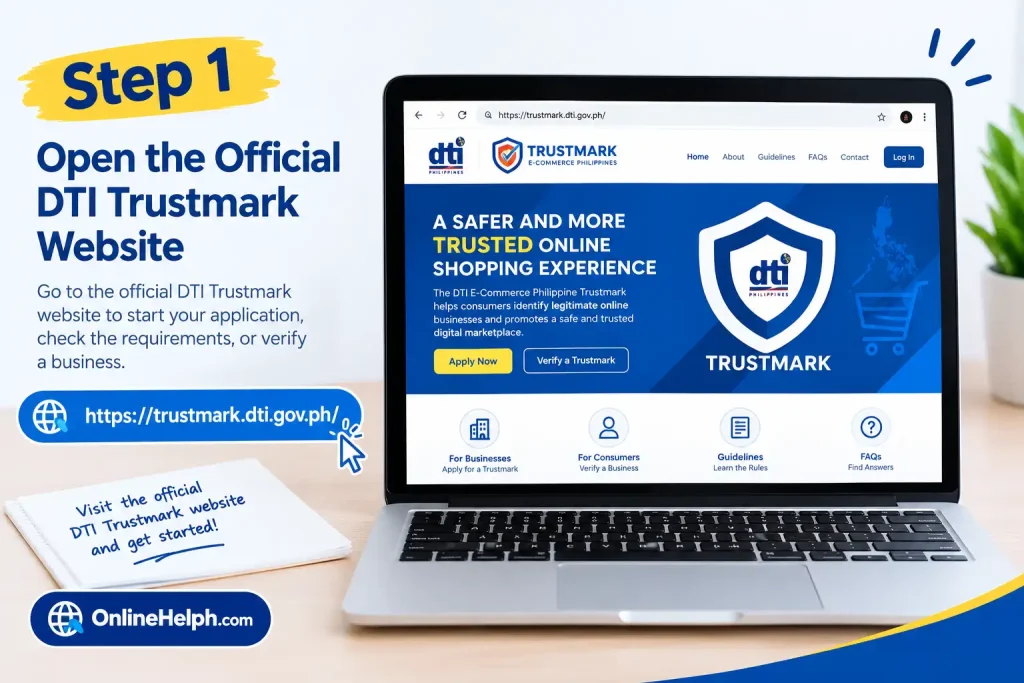
Visit:
Use the official DTI domain rather than third-party websites claiming to process DTI Digital Trustmark applications.
Step 2: Select Register
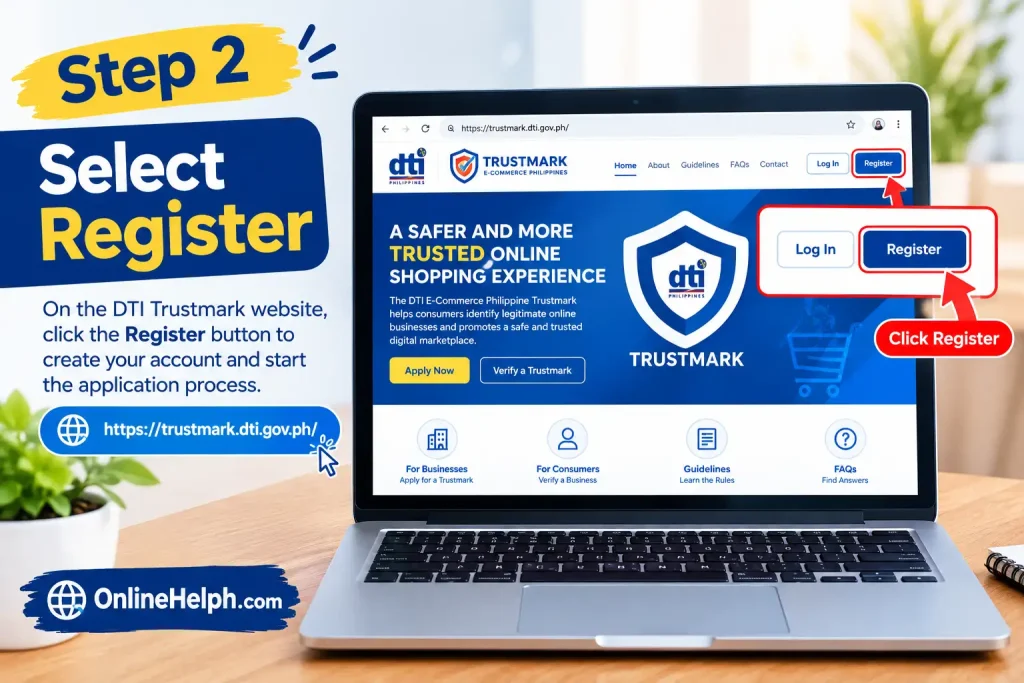
The registration page asks for basic account information, including first name, middle name, last name, suffix where applicable, mobile number, email address, and password. The portal also provides a section for the authorized representative’s government-issued ID and attachment.
Step 3: Enter your personal information
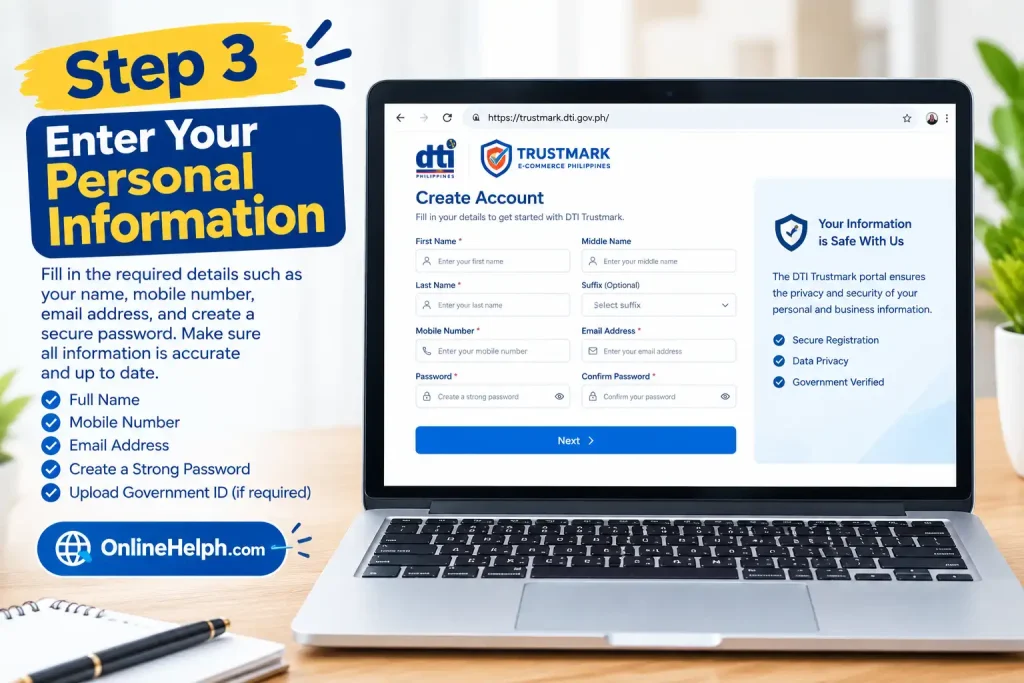
Enter your details carefully. Make sure the name, mobile number, and email address are accurate because these details may be used for communication and account access.
Step 4: Create a secure password
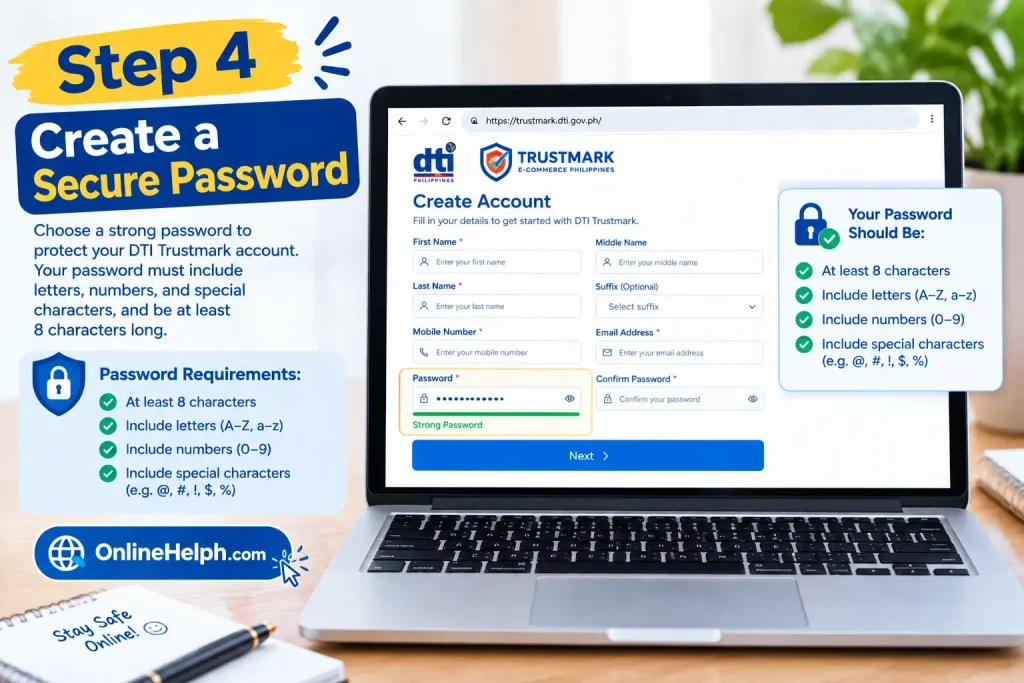
The current registration page requires a password containing letters, numbers, and special characters, with a minimum length of eight characters.
Step 5: Provide the authorized representative information
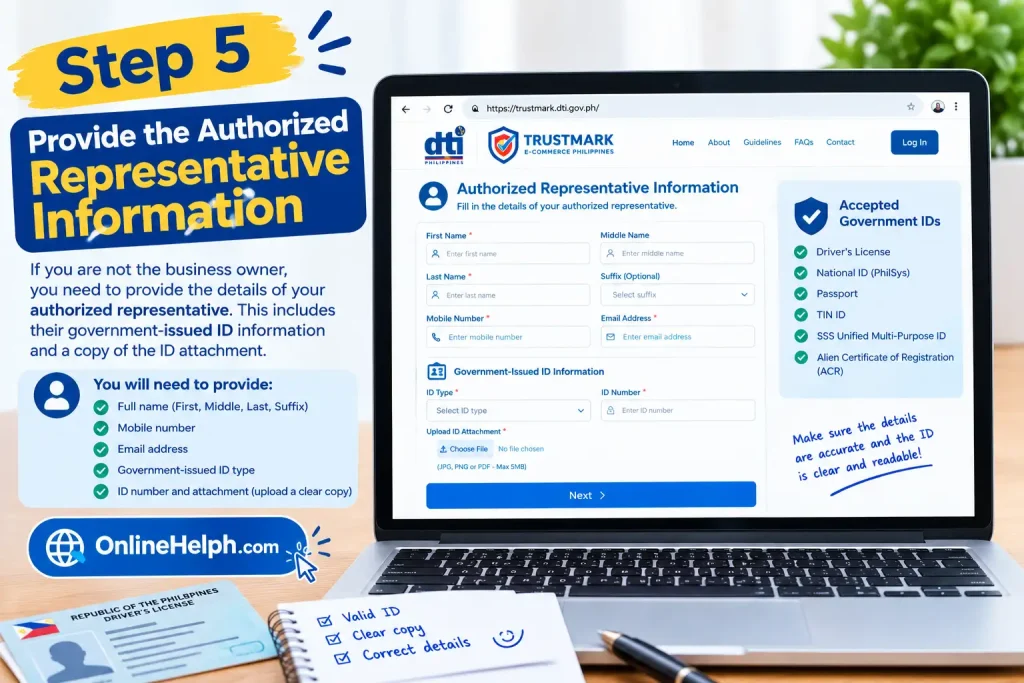
If the application is being handled by an authorized representative, provide the requested government-issued ID information and upload the required attachment.
After completing the registration information, proceed according to the instructions displayed by the DTI Digital Trustmark portal.
Why Businesses Apply for DTI Trustmark
The DTI Digital Trustmark is more than a graphic placed on an online store. It connects the business with a government verification system and publicly accessible business information.
According to the official FAQ, Trustmark holders may receive benefits such as access to DTI programs and services, business matching and market-access opportunities, participation in DTI-led trade fairs and training, and possible inclusion in official promotions or future recognition programs.
For consumers, the DTI Trustmark can provide an additional verification point when evaluating an online seller.
DTI Trustmark Application Process: Step-by-Step Guide
After preparing your documents and creating an account, the next stage is completing the DTI Digital Trustmark application. The official DTI guidelines state that applications are submitted electronically through the Trustmark registration portal and are evaluated after the required documents have been submitted.
The application should contain accurate and complete information because the applicant is responsible for the information and documents submitted through the portal. The DTI Digital Trustmark terms also require applicants to provide information that is complete, true, and correct.
Step 1: Log In to the DTI Trustmark Portal
Go to the official DTI Digital Trustmark website:
DTI Trustmark Official Website
Use the login details created during registration. Avoid using unofficial websites or third-party services claiming to issue a Department of Trade and Industry Trustmark.
Once logged in, review your account information before proceeding with the application.
Step 2: Start the Trustmark Application
From your account dashboard, select the option to begin the Department of Trade and Industry Trustmark application.
The application is completed electronically through the official Trustmark registration portal. The DTI guidelines require an accomplished online application form together with an undertaking to comply with applicable laws, rules, and regulations.
Before submitting the application, check that your:
Step 3: Enter Your Business Information
Provide the business information requested by the DTI Trustmark application.
Your business name should correspond with the registration documents submitted to the appropriate government agency. Depending on the business structure, this can include DTI Business Name registration, an SEC Certificate of Incorporation, or a CDA Certificate of Registration.
You will also need information connected with your BIR registration.
The official DTI guidelines specify that the BIR Certificate of Registration, Form 2303, should reflect the registered business or trade name to be used by the Trustmark holder and the applicable line of business or Philippine Standard Industrial Classification (PSIC) code.
Step 4: Add Your Online Selling Platforms
One important part of the DTI Trustmark application is identifying where the business conducts online sales.
Enter the websites and digital platforms used by your business. Depending on your operation, this may include:
Make sure the URLs are accurate and active.
The DTI guidelines specifically require applicants to submit a list of digital platforms or websites used for online sales.
This information is also relevant to the Trustmark’s verification system. The official DTI website provides a business-verification function that can be used to search for a business by business name, Trustmark number, or store URL.
Step 5: Upload the Required Documents
Upload the supporting documents requested by the application.
The principal DTI Trustmark documents include:
The exact document applicable to you depends on your business structure. The official guidelines should be checked before submitting the application.
Accepted Government IDs
As of January 8, 2026, the official DTI Trustmark website states that only the following government-issued identification cards are accepted for the application:
This is particularly important because an applicant using an older or different identification document may encounter an issue during document evaluation.
Step 6: Provide Your Internal Redress Mechanism
The DTI Trustmark application requires a step-by-step guide explaining the business’s internal redress mechanism.
In simple terms, this should explain how your business handles customer complaints.
For example, your procedure can explain:
The DTI specifically identifies an internal redress mechanism as one of the requirements for a Trustmark holder.
A clear procedure helps demonstrate that customers have an identifiable process for raising and resolving concerns.
Step 7: Review the Application Carefully
Before clicking the final submission button, review every field.
Pay particular attention to:
The official portal terms state that the registrant is responsible for the information submitted and confirms that the information is complete, true, and correct.
A mismatch between your business registration documents and application information may therefore require clarification or correction.
Step 8: Submit the DTI Trustmark Application
After checking the information, submit the completed application through the official portal.
The DTI guidelines state that applications are electronically submitted through the DTI Trustmark registration portal. The E-Commerce Bureau then reviews and evaluates the application. The stated evaluation period is seven working days from submission of complete requirements.
This means applicants should distinguish between submitting an application and submitting a complete application. Missing documents or information can affect the evaluation process.
DTI Trustmark Fees
The official DTI Trustmark pages currently provide a fee schedule that includes an application/renewal fee, web administrative fee, documentary stamp tax, and other fees for specific transactions.
The official FAQ provides the following initial registration amounts based on enterprise classification:
| Enterprise classification | Application fee | Web administration | Documentary stamp | Total |
|---|---|---|---|---|
| Micro enterprise | ₱0 | ₱100 | ₱30 | ₱130 |
| Small enterprise | ₱500 | ₱100 | ₱30 | ₱630 |
| Medium enterprise | ₱1,000 | ₱100 | ₱30 | ₱1,130 |
The DTI FAQ states that the initial registration fee is free for DTI-registered micro enterprises, while the applicable administrative and documentary charges remain. It also states that small enterprises receive a 50% discount on the initial application fee.
Because fee policies can change, applicants should verify the amount shown by the official portal or Statement of Account before making payment.
What Happens After DTI Trustmark Approval?
Once the DTI Trustmark application is approved, the applicant receives an electronic Statement of Account. After payment of the applicable fees, the DTI electronically issues the Trustmark together with a unique security number and QR code. An electronic E-Commerce Philippine Trustmark Certificate is also issued.
The approved business is also automatically listed in the publicly accessible Online Business Database (OBD) according to the official guidelines.
The QR code provides another way to verify the Trustmark and access the holder’s business information.
How to Verify a DTI Trustmark
Consumers can use the official DTI Trustmark website to verify a business.
The portal provides options to search for a business using information such as:
The official website explains that the Trustmark includes a unique security number and QR code for verification.
When checking an online seller, consumers should make sure that the business information shown by the official DTI system corresponds with the seller they intend to transact with.
Official verification portal:
DTI Trustmark Verification
How Long Does DTI Trustmark Processing Take?
The official DTI Trustmark FAQ states that processing takes seven working days from submission of complete requirements. After approval, the certificate is released upon confirmation of payment.
Applicants should therefore make sure that all required information and documents are submitted correctly instead of assuming that the seven-working-day period starts with an incomplete submission.
How Long Is the DTI Trustmark Valid?
A DTI Trustmark is valid for one year from the date of issuance. The official guidelines state that renewal must be submitted no earlier than three months and no later than 30 calendar days before expiration.
For example, businesses should monitor their Trustmark expiration date and prepare updated documents before the renewal window.
This helps prevent the Trustmark from expiring while the business continues conducting online transactions.
DTI Trustmark Certificate and QR Code
An approved DTI Trustmark includes a unique security number and QR code. The official guidelines specify that the QR code directs users to the Online Business Database entry of the Trustmark holder.
Businesses should use the official Trustmark design supplied by DTI rather than creating their own version.
The Trustmark must not be altered, transferred, or used for unauthorized purposes. The DTI guidelines specifically restrict unauthorized use and provide that misuse can result in revocation and other applicable enforcement actions.
DTI Trustmark Renewal, Compliance, Verification & Common Questions
Obtaining a DTI Trustmark is only one part of maintaining an online business’s compliance. Trustmark holders must continue meeting the applicable requirements, keep their business information accurate, and follow the conditions governing the use of the Trustmark.
The official DTI Trustmark portal should always be treated as the primary source for current application, renewal, payment, and verification information.
DTI Trustmark Renewal
A DTI Trustmark is valid for one year from its date of issuance. Businesses that want to continue using the Trustmark should prepare for renewal before the current certificate expires.
According to the official DTI guidelines, a renewal application may be submitted no earlier than three months and no later than 30 calendar days before the Trustmark’s expiration date. (trustmark.dti.gov.ph)
The renewal process generally requires the holder to access the official portal, review and update its information, submit the required renewal documents, and settle applicable fees.
Businesses should not wait until the last moment to review their Trustmark status. Changes to the business name, registration, website, online platforms, authorized representative, or other relevant information should be checked before submitting a renewal application.
Official portal: DTI Trustmark
What Happens If a DTI Trustmark Expires?
Once the validity period ends, the business should no longer represent itself as a current DTI Trustmark holder unless its Trustmark has been renewed or otherwise remains valid under the applicable DTI rules.
Businesses should therefore monitor the expiration date displayed on their Trustmark certificate and begin the renewal process during the prescribed renewal period.
An expired Trustmark should not be presented to customers as evidence of current Trustmark certification.
DTI Trustmark Compliance Requirements
Trustmark holders are expected to comply with applicable Philippine laws, rules, regulations, and the terms associated with the program.
The DTI guidelines identify responsibilities involving the proper use of the Trustmark, accuracy of business information, consumer protection, and compliance with applicable e-commerce requirements. (trustmark.dti.gov.ph)
For an online business, practical compliance means keeping important information current and ensuring that customers can understand how the business operates.
Businesses should regularly review:
Keeping this information updated can also make the business’s online presence more consistent with the information submitted during the DTI Trustmark application.
Proper Use of the DTI Trustmark
A Trustmark is issued to an approved business and should be used only according to the rules provided by DTI.
The official guidelines state that the Trustmark should not be altered and should not be used by an entity that is not entitled to use it. Unauthorized use may lead to appropriate action, including revocation. (trustmark.dti.gov.ph)
Businesses should therefore avoid:
The safest approach is to download or use the official materials supplied through the DTI system and follow the applicable guidelines.
How Consumers Can Check a DTI Trustmark
One of the important functions of the DTI Trustmark program is allowing consumers to verify participating businesses.
If an online store displays a Trustmark badge, customers can use the official DTI verification system rather than relying only on the image displayed on the seller’s website.
The official DTI system allows searches using information such as:
The Trustmark’s QR code is particularly useful because it connects the verification process with the business’s record in the DTI Online Business Database. (trustmark.dti.gov.ph)
Official verification: trustmark.dti.gov.ph
What Should Consumers Check?
When verifying an online seller, customers should compare the information shown in the official DTI Trustmark database with the store they are visiting.
For example, check whether:
A Trustmark should be treated as one source of business verification. Customers should still exercise normal care when making online purchases, particularly for payment, personal information, product claims, and delivery arrangements.
DTI Trustmark and Online Consumer Protection
The DTI Trustmark program forms part of the Philippine government’s broader e-commerce framework.
The Internet Transactions Act of 2023, or Republic Act No. 11967, provides a legal framework for internet transactions and consumer protection in the Philippines. The DTI Trustmark guidelines identify the program as part of the implementation of this broader e-commerce environment. (trustmark.dti.gov.ph)
For online businesses, this means that Trustmark registration should not be viewed simply as obtaining a badge. Businesses should also understand their responsibilities when selling goods or services through digital channels.
Common DTI Trustmark Application Problems
Applicants may encounter problems when submitting their DTI Trustmark application. Many issues can be avoided by carefully reviewing the information before submission.
Business Information Does Not Match
If the business name or registration details do not match the supporting documents, review the information entered in the application and compare it with the relevant government certificates.
Incorrect Website or Store URL
Make sure every online selling URL submitted during the application is accurate. A typo can make it difficult to associate the business with the correct online store.
Unclear Document Uploads
Documents should be readable and complete. If the uploaded copy is blurry, incomplete, or missing important information, the application may require further attention.
Incorrect Government ID
Applicants should use an accepted government-issued ID. The current DTI Trustmark website identifies six accepted IDs: Driver’s License, National ID (PhilSys), Passport, TIN ID, SSS Unified Multi-Purpose ID, and ACR. (trustmark.dti.gov.ph)
Incomplete Complaint Procedure
The internal redress mechanism should explain how customers can submit and resolve complaints. A vague statement may not provide the level of information expected in the application.
Tips Before Submitting a DTI Trustmark Application
Before submitting your application, use this checklist:
Business information
Online presence
Documents
Consumer support
Final review
DTI Trustmark FAQs
1. What are the requirements for DTI Trustmark?
To apply for the DTI Trustmark, online businesses need to complete the application through the official DTI Trustmark Portal and submit the required business registration, BIR, identification, online-platform, and compliance documents.
2. Is DTI Trustmark mandatory?
The E-Commerce Philippine Trustmark is currently voluntary until December 31, 2026, according to the information in the provided search data. It is encouraged for online merchants, e-retailers, and digital platforms.
3. How much is the DTI Trustmark registration fee?
The DTI Trustmark registration fee ranges from ₱130 to ₱1,130, depending on the enterprise classification. The provided data lists ₱130 for micro enterprises, with higher fees for larger businesses.
4. How do I get a DTI Trustmark?
You can get a DTI Trustmark by registering through the official DTI Trustmark Portal, completing the online application, and submitting the required compliance documents for evaluation.
5. How do I renew my DTI Trustmark?
You can renew your DTI Trustmark through the Philippine Trustmark Portal. The renewal request should be submitted within the specified renewal period—not earlier than three months and not later than 30 calendar days before expiration.
6. Where can I find my DTI Trustmark reference number?
Your DTI Trustmark application reference number can be found in the confirmation email associated with your application on the DTI portal.
7. What is a DTI Trustmark?
A DTI Trustmark is a digital certification mark associated with the Philippine e-commerce trust program. It provides a way for consumers to identify and verify participating online businesses through the official DTI system.
8. How can I check if an online business is legit in the Philippines?
You can check an online business by verifying its registration with the appropriate Philippine government agency, such as DTI or SEC. For businesses displaying a DTI Trustmark, consumers can also use the official Trustmark verification system to check the business information.
9. What documents are needed to get a DTI Trustmark?
The DTI Trustmark application requires relevant business registration documents, BIR registration documentation, an accepted government-issued ID, information about online selling platforms, and the required application and compliance information.
10. How long does it take to get a DTI Trustmark?
The official DTI Trustmark guidelines state that applications are evaluated within seven working days from the submission of complete requirements. Applicants should therefore make sure all required information and documents are complete before submission.
Conclusion
The DTI Trustmark provides Philippine online businesses with an official way to participate in the DTI’s e-commerce trust and verification program. From account registration and document submission to evaluation, payment, certificate issuance, verification, and renewal, applicants should carefully follow the requirements shown on the official DTI Trustmark portal.
Before submitting an application, make sure your business information, registration documents, BIR records, government ID, online-store details, and internal complaint-handling procedure are accurate and complete. Once approved, keep your DTI Trustmark information updated and use the official Trustmark and QR code according to DTI guidelines.
For the latest requirements, fees, application status, verification procedures, and renewal information, always check the official website:
DTI Trustmark Official Website
Using the official DTI Trustmark portal is the safest way to ensure that your application and business verification information comes directly from the Department of Trade and Industry.
Read more
NBI Clearance Renewal Online: Requirements, Fees & Step-by-Step Guide
Sumbong sa Pangulo Website: Complete Guide to Reporting Flood Control Projects Online
PNP-FEO System: Complete Guide to the New FEO Online System
PAIS Admin Portal: Complete Guide to PAISadmin PNP Login, Records and Payslip
eTravel Philippines: Complete Online Registration Guide